Updated: 26 October 2026
Affiliate disclosure: As an Amazon Associate I earn from qualifying purchases. This article contains paid links. ProductPicks may receive a commission when you buy through them, at no extra cost to you.
How we compared: This article uses manufacturer specifications, product sheets and support documentation. We have not carried out hands-on testing of these chargers. The power figures below are manufacturer-rated maximums for compatible devices.
A single charger can simplify your desk and travel bag, but choosing a 65W GaN charger takes more than counting its sockets. The useful questions are which port can power your laptop, what happens when you connect your phone, and whether you already own the right cable.
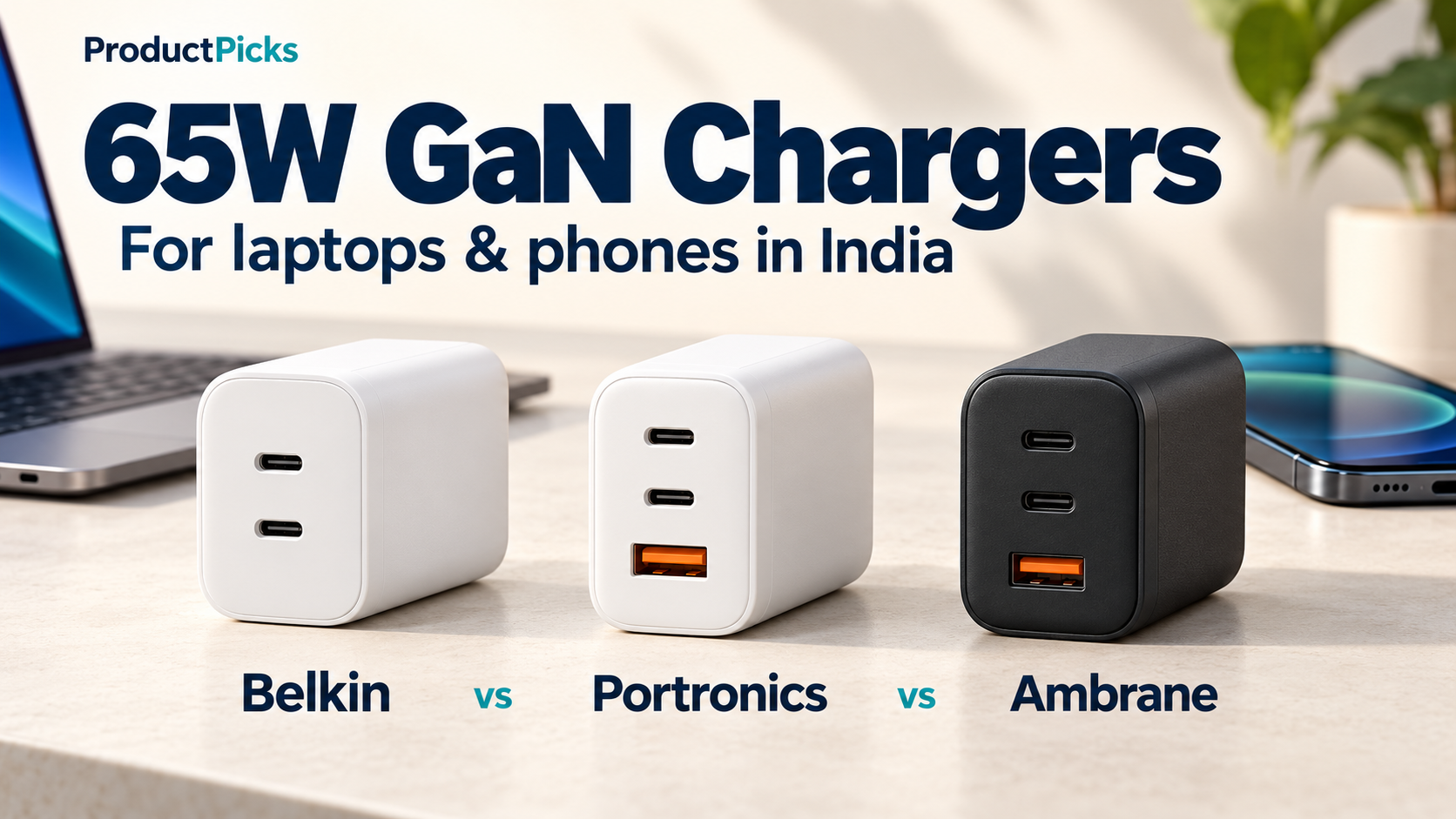
Here, we compare three models with Amazon India listings: the Belkin BoostCharge Pro 65W dual USB-C charger, Portronics Adapto 65M, and Ambrane RAAP G65.
Our starting choice for a straightforward two-device setup is Belkin, particularly if you value its longer stated warranty. Ambrane is worth a close look when you need a third port and want a documented power-sharing arrangement. Portronics is a practical alternative if its current price is attractive and its port limits suit your devices. The details below explain those recommendations.
Belkin vs Portronics vs Ambrane: quick comparison
| Feature | Belkin WCH013 | Portronics Adapto 65M | Ambrane RAAP G65 |
|---|---|---|---|
| Ports | 2 USB-C | 2 USB-C + 1 USB-A | 2 USB-C + 1 USB-A |
| 65W laptop output | Either USB-C port when used alone | PD2 USB-C port when used alone | Either USB-C port when used alone |
| Other single-port limits | No USB-A port | PD1: 20W; USB-A: 20W | USB-A: 36W |
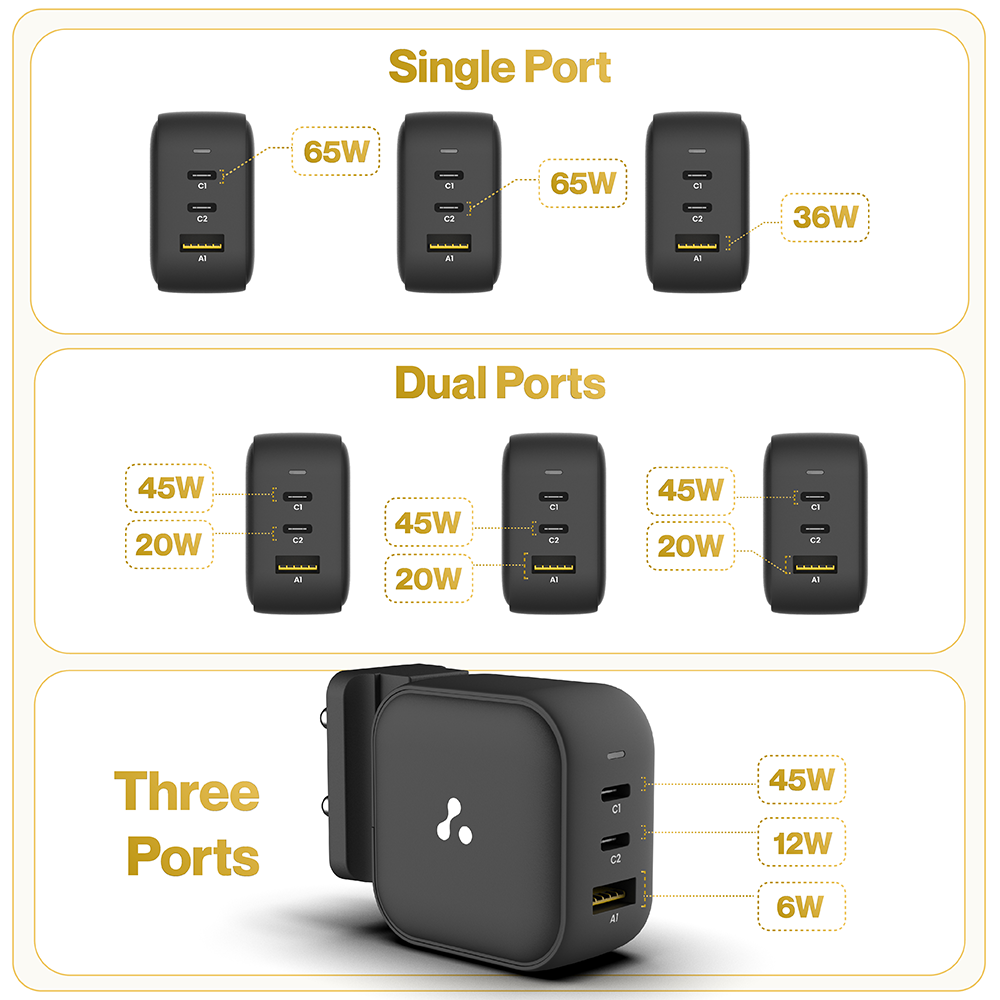
| Both USB-C ports in use | 45W + 20W | Exact split not established from the official material reviewed | C1: 45W; C2: 20W |
| All three ports in use | Not applicable | PD2: 45W; PD1: 10W; USB-A: 10W | C1: 45W; C2: 12W; USB-A: 6W |
| Advertised charging standards | USB PD 3.0 and PPS | USB PD and PPS | USB PD and Quick Charge 3.0; PPS profile not verified |
| Stated warranty | 2 years | 6 months | 180 days |
| Charging cable | Not included with the linked charger-only variant | Not included | No cable listed in the manual’s package contents |
| Current Amazon offer | Check Belkin on Amazon (paid link) | Check Portronics on Amazon (paid link) | Check Ambrane on Amazon (paid link) |
Specifications: Belkin [1] [2] [3]; Portronics [4] [5] [6] [7]; Ambrane [8] [9] [10]. Port allocations are ceilings, not a promise that every connected device will receive that wattage. Check the exact model and bundle before ordering.
1. Belkin 65W: a straightforward choice for two USB-C devices
The linked Belkin model is the white WCH013zbWH. It has two USB-C outputs, supports USB Power Delivery and PPS, and carries a stated two-year warranty. That warranty is its clearest advantage over the shorter coverage advertised for the other two models. [1]
Belkin specifies up to 65W with one port in use, falling to a 45W + 20W allocation with both connected. This can suit a compatible laptop and phone, provided those limits match your needs. A laptop that needs its full 65W while you work will have less power available once you plug in the second device. [2]
The trade-off is straightforward: you get two USB-C ports and the longest stated warranty here, but there is no USB-A socket or third output. The linked charger-only variant also requires you to supply your own cables. [1]
Choose it if: you mainly charge two devices through USB-C, are comfortable with the shared output, and value the longer warranty enough to justify any price difference.
Look elsewhere if: you need three sockets or a laptop that must keep receiving 65W while another device charges.
Check the Belkin 65W charger on Amazon India — paid link.
2. Portronics Adapto 65M: useful when you need USB-A as well
The Adapto 65M combines two USB-C sockets with one USB-A socket. Portronics advertises PD and PPS support and a six-month warranty. Its product sheet states that a charging cable is not included. [4] [7]
Connect your laptop to PD2. The two USB-C ports are not interchangeable in output: Portronics rates PD2 at 65W and PD1 at 20W when each is used alone. The USB-A port is also rated at 20W alone. Choosing the wrong USB-C socket could therefore explain unexpectedly slow laptop charging. [5]
With all three ports occupied, its published allocation is:
- PD2: 45W.
- PD1: 10W.
- USB-A: 10W.
That arrangement may suit a laptop alongside smaller devices, but the two secondary outputs have relatively modest power available. A phone capable of faster charging will be limited by that allocation when all three sockets are occupied. [6]
The official material reviewed did not clearly establish every two-port combination. If you specifically need 45W for a laptop and 20W for a phone at the same time, confirm that exact arrangement with Portronics before buying.
Choose it if: you want USB-C and USB-A in one charger, its current offer is competitive, and you are happy to use the labelled PD2 port for the laptop.
Main limitation: only one USB-C port offers the advertised 65W maximum, and the two-port sharing details need confirmation.
Check the Portronics Adapto 65M on Amazon India — paid link.
3. Ambrane RAAP G65: flexible single-port charging and a clear sharing chart
The RAAP G65 also has two USB-C outputs and one USB-A output. Its useful distinction is that either USB-C port can provide up to 65W when used alone. Ambrane rates USB-A at up to 36W for compatible charging modes. [10]
Ambrane publishes the following two-device combinations:
- C1 + C2: 45W + 20W.
- C1 + USB-A: 45W + 20W.
- C2 + USB-A: 45W + 20W.
With all three connected, the allocation changes to 45W on C1, 12W on C2 and 6W on USB-A. If your laptop is part of a three-device setup, connect it to C1. The remaining outputs are better suited to devices whose power requirements fit those lower limits. [10]
This makes the power-sharing trade-off easy to understand before buying: two-device use gives the second device up to 20W, while adding a third reduces that allowance.
Ambrane advertises USB Power Delivery and Quick Charge 3.0, with a 180-day warranty. Its manual lists the charger and a rating card in the package; a charging cable is not listed. Budget for a suitable cable unless the specific Amazon offer explicitly includes one. [8] [9]
Choose it if: you want a three-port charger, would find either USB-C socket useful for charging a laptop alone, and prefer having the sharing combinations documented.
Main limitation: with all three ports in use, C2 is limited to 12W and USB-A to 6W, so a connected phone may charge more slowly. The warranty is considerably shorter than Belkin’s.
Check the Ambrane RAAP G65 on Amazon India — paid link.
What to check before buying a 65W charger
Make sure your laptop supports charging through USB-C
A USB-C socket alone does not establish that a laptop accepts USB-C charging. Check the laptop manufacturer’s specification for USB Power Delivery input and the recommended charging wattage. Some USB-C ports provide data without accepting charging power. [14]
Also think about how you use the laptop. If its recommended adapter supplies 65W, receiving 45W may mean slower battery charging or insufficient power during demanding work. The result depends on the laptop and workload.
If you need 65W for a laptop plus 20W for a phone simultaneously, you are asking for 85W in total. Consider a higher-output charger, such as a suitable 100W model, and verify that its particular two-port combination actually supplies at least 65W + 20W.
Use a cable that can carry the required power
For the full 65W USB-C output, use a suitable 5A electronically marked USB-C to USB-C cable, commonly sold with a 100W or 240W rating. A standard 3A/60W cable cannot carry a full 65W at 20V.
A higher cable rating does not make a device take more power; it gives the cable enough capacity for the charging arrangement. Your laptop still needs to support the power profile offered by the charger. [11] [12]
Check the phone’s charging protocol, especially for Samsung 45W
A 65W charger does not automatically deliver every phone’s maximum charging speed. The phone, charger and cable must support a compatible charging mode. USB Power Delivery allows devices to negotiate the power they need. [12]
Samsung’s 45W charging requires the appropriate compatible charging setup and a 5A cable. For these three chargers, we would not assume Samsung’s 45W mode is guaranteed from the headline wattage alone. [13]
Belkin confirms PPS support, but its support pages differ on the PPS current available. Portronics advertises PPS without a complete verified voltage/current table in the material reviewed. Ambrane’s accessible RAAP G65 specifications confirm PD and QC 3.0, but do not establish a full PPS profile. If a particular phone’s maximum charging mode is your priority, confirm the exact charger variant with the manufacturer. [2] [3] [4] [8]
Compare the complete cost
When checking Amazon, compare the exact model, supplied accessories and applicable warranty. A lower charger price can be less attractive if you still need to buy one or two suitable cables.
Decide whether the third port solves a real problem for you. If you only charge a laptop and phone, two suitable outputs may be enough. If you regularly connect an accessory as well, evaluate the three-port allocation rather than assuming that every socket retains its single-device speed.
Frequently asked questions
Can a 65W charger charge a phone that only accepts 20W?
Yes, when the charger, phone and cable support a compatible charging mode. The 65W rating describes the charger’s capability; USB PD lets the device negotiate an appropriate power level. It does not force the full 65W into the phone. [12]
Can these chargers replace a gaming laptop’s power adapter?
Only if the laptop supports USB-C charging and its requirements fit the available output. A high-performance laptop may need much more power under load. Treat its manufacturer’s charging specification as the deciding factor. [14]
Which model has the longest warranty?
Belkin states two years for the WCH013 model. Portronics states six months for Adapto 65M, and Ambrane states 180 days for RAAP G65. Check the terms applicable to the exact unit and seller you choose. [1] [4] [8]
Which one should you buy?
Choose Belkin for a simple two-USB-C setup when the documented 45W + 20W sharing arrangement is sufficient and the longer warranty matters to you.
Choose Ambrane when you need three ports and value the flexibility of using either USB-C port for a single 65W device. Its published sharing chart also makes planning a multi-device setup easier.
Consider Portronics when its price makes it an appealing alternative and you are comfortable reserving PD2 for your laptop. Its published three-device allocation can work for a laptop and modest accessory charging, but confirm any specific two-device output requirement.
For a laptop that must receive its full 65W while your phone charges, choose a charger with a higher total output and an explicitly suitable power-sharing configuration.
Sources
Manufacturer documentation checked on 26 October 2026. Recommendations are based on the published features and limitations above; they do not represent comparative laboratory testing.
- Belkin India: WCH013zbWH product specifications and warranty.
- Belkin: WCH013 frequently asked questions.
- Belkin: wall charger comparison chart.
- Portronics: Adapto 65M product specifications and warranty.
- Portronics: individual-port output diagram.
- Portronics: three-device power-sharing diagram.
- Portronics: Adapto 65M product sheet.
- Ambrane: RAAP G65 product specifications and warranty.
- Ambrane: RAAP G65 user manual.
- Ambrane: power-distribution chart linked from the official manual.
- Belkin: USB-C cable ratings and electronic marking.
- USB-IF: USB Power Delivery.
- Samsung: Galaxy charging types and cable requirements.
- Belkin: USB-C charging support and laptop power requirements.